
Every return closes signed.
A customer return or goods going back to a supplier, straight from the phone: scan what changes hands, capture a signature on screen, and the document keeps the signature, the time, and exactly what moved.
- Customer and supplier returns, one route
- Scan what actually returns, type nothing
- A signature on screen, stored on the document
Over 600 businesses tried it and loved it






















From the customer to you, and from you to the supplier.
Exactly one route, in both directions: open a document, scan what changes hands, sign and close. Only the party across the counter changes, and all of it happens from the phone, wherever the goods are.
Customer return
A customer brings goods back. Pick them from the directory or type their details, and the items come back to you documented.
From the phone, at the counter or on site
Supplier return
Faulty or surplus goods go back out. Pick the supplier, scan what leaves, and their rep signs for what they took.
From the phone, at the dock or in the warehouse
Opens wherever it happens
From the office screen or from the phone at the counter. Same document, same fields: branch, customer or supplier, reason and notes.
Linked to the original order
Name the order the goods shipped on, and every future enquiry starts with context instead of from nothing.
You decide who opens one
Opening and editing a document takes a permission, and you can give it to any employee who needs it, not only to managers. The scanning itself is open to anyone with access.
Even for someone not on file
Pick the customer or the supplier from the directory, and if they are not there, type a name and phone on the spot. A walk-in does not stop the process.
One return, from opening to signature.
This is how a return closes while the customer stands at the counter, in four steps.
- 01
Open a return document
Pick the direction (from a customer or to a supplier), the branch, and the party. Link the original order and record a reason.
- 02
Scan what comes back
The document opens in the scanning screen. Everything that changes hands is scanned in, and the same item twice simply accumulates into one line.
- 03
Sign on screen
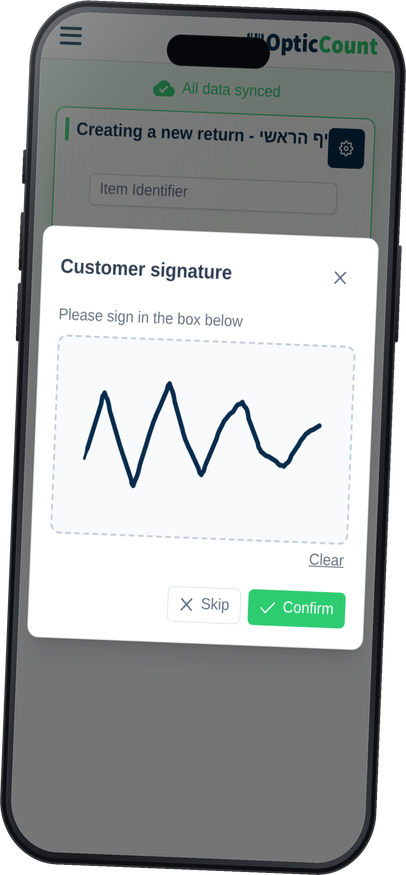
The customer or the supplier's rep signs with a finger. The signature is stored on the document itself, along with the time.
- 04
Close, and it's recorded
Quantities lock as scanned, and with an ERP connected the document posts to it. If it rejects, the return does not close.
And next month's argument ("I returned it" against "we never got it") ends with a signed, timestamped document instead of whoever's memory is louder.
A signature on the document. A document in the system.
The two things that turn a return from a note in a pad into a record you can lean on: a signature that stays, and a document that reaches the system you actually run on.
The signature stays on the document
Not a photo in a chat and not a page in a binder. It is stored on the return itself, timestamped, and opens from any screen.
It's optional, not a gate
A customer in a hurry? Skip it, and the return closes and is documented exactly the same.
The ERP is not left behind
On close you choose which document to produce in the connected system. If it rejects, the return stays open on our side, so the two never drift apart.
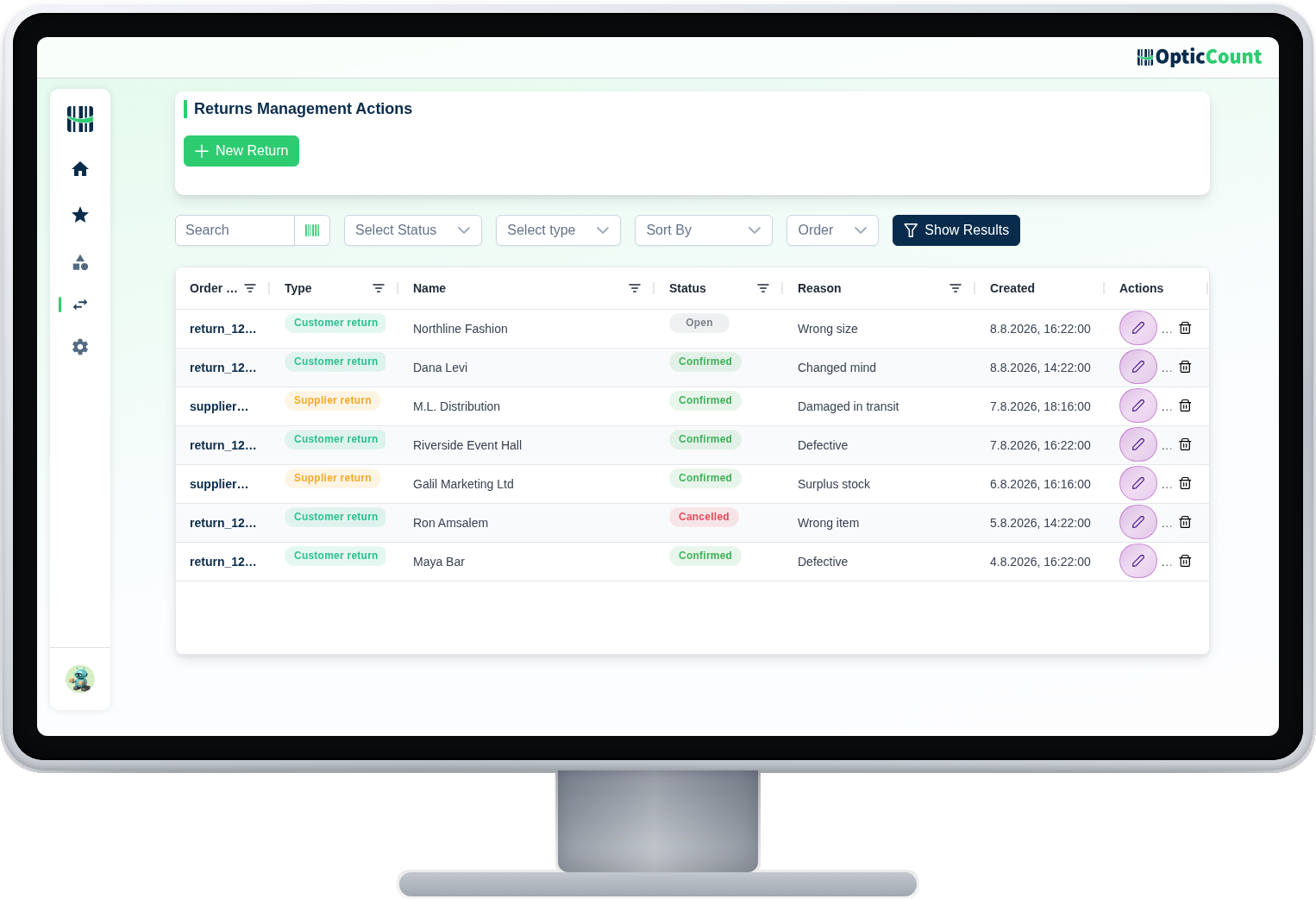
A list you can live with
Every return in one table: filter by branch, status and direction, and search by number, customer or reason.
- Opening
- Scanning
- Created
- Posted
These are the system's own statuses. A return opened by mistake can be cancelled, and it stays in the list marked as such.
Everything a real return asks for.
Everything a real return asks for.
Not only recording that something came back. Also who returned it, why, exactly what, and what happened to it next.
What people ask us
What's the difference between a customer and a supplier return?
Same route, opposite direction. On a customer return the goods come back to you and the customer signs. On a supplier return the goods go out, and the supplier's rep signs for what they took. Each direction has its own number sequence.
Is the signature mandatory?
No. Skip it and the return closes normally. When it is captured, it is stored on the document itself with the signing time, available whenever you need to prove what changed hands.
Does the return reach our ERP?
With a supporting integration connected, you choose on close which document to produce in it. If that system rejects the document, the return does not close on our side, so the two systems never drift apart.
Can we tell which order the goods came from?
Yes. When opening the document you can name the original order, and every future enquiry starts from that link.
Who can open a return, and who can only scan?
Opening, editing and deleting return documents takes a dedicated permission. It is not reserved for managers: you can grant it to any employee, and to several employees at once. The scanning and the signature at the counter can be done by any employee with access to the module.
What if we opened a return by mistake?
As long as it hasn't closed, delete or cancel it. A cancelled return stays in the list with a cancelled status, so even the mistakes are documented.
See it work on your actual inventory
Want to save your team hours and cut mistakes? Leave your details and we'll get back to you today, with answers to your questions.
Nice to meet you
Just so we know who we're calling.