
No signal in the warehouse? Keep scanning.
Every scan is saved to the device first. A quiet sync queue uploads it the moment there is a connection, and a status bar at the top of the screen says whether everything is on the server or something is still transmitting. Reception is the system's problem, not the worker's.
Device first
The scan is written locally before anything else. The network can join whenever it feels like it.
Every 15 seconds
The sync queue retries in the background, again and again, with nobody pressing anything.
In plain sight
The status bar tells the truth: green when everything is on the server, amber while something still transmits.
The worker always knows the sync state. Always.
These are the states the screen actually shows, in the app's own words. No guessing and no "I think it saved".
"All counts saved successfully"
The normal state, with a small green cloud: everything scanned is already on the server, and the manager sees it live from the office.
"Transmitting count data..."
No signal? The bar stays amber and keeps trying in the background. Keep scanning: everything accumulates on the device and uploads the moment the connection returns.
"One moment, syncing data with the server"
At the start of the day the catalog comes down to the device, with a progress percentage. That is why search and autocomplete keep working with no network afterwards.
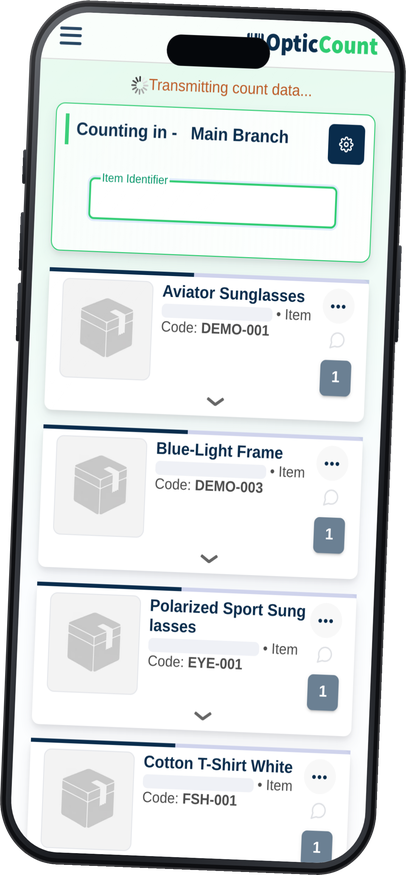
Built offline-first, not patched after the fact.
Saved locally first
Every action is written to the device before it tries to upload
A stubborn sync queue
Retries in the background and reports if something is stuck
Search with no network
The catalog is stored on the device, autocomplete works offline
The engine needs no server
Barcode decoding runs on the device itself
Several workers in parallel
Everyone works on their own device, it all merges on sync
No app store required
Runs in the browser as a PWA, add to home in a tap
Older devices too
Does not require the latest iPhone or Android generation
Managers see it land
The moment sync runs, progress appears on the management screen
Anywhere the signal gives up.
What people ask us
What if the phone dies mid-count?
Whatever was already saved on the device uploads the moment the phone is back on and connected. You continue from where you stopped.
How long can we work without a connection?
Hours of continuous work. Scans accumulate on the device and upload in one go when there is signal, even if that only happens at the end of the shift.
How do we know everything really uploaded?
The status bar at the top of the screen. When it is green and says all counts are saved, that is exactly what happened. While anything is still transmitting, the bar stays amber and leaves you in no doubt.
Two workers scanned the same area offline. What happens on sync?
Everything uploads and merges into the same count, and the system's duplicate alerts flag what is worth checking. Better than finding it in the report.
See it work on your actual inventory
Want to save your team hours and cut mistakes? Leave your details and we'll get back to you today, with answers to your questions.
Nice to meet you
Just so we know who we're calling.