























Typing line by lineShoot, check, approve
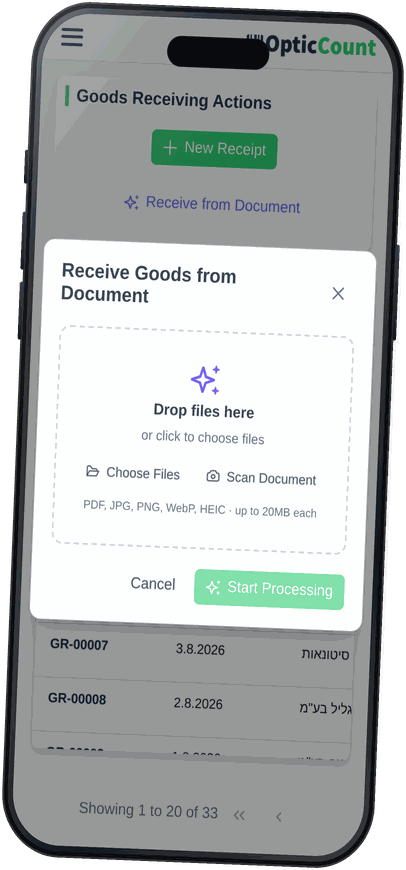
Photograph it on a phone mid-unload, or upload a PDF from a desk
AI reads the packing slip or invoice, pulls out every line and matches it to an item in your catalog. You review what it flagged, approve, and branch stock updates.
Detected items
AI is reading the documentOver 600 businesses tried it and loved it
Typing line by lineShoot, check, approve
Photograph it on a phone mid-unload, or upload a PDF from a desk
Ten minutes of typing10 to 60 seconds
That is what it takes for a document to become an item list ready for review. Close the page and keep unloading in the meantime.
Every line matched before stock moves
Anything the system is unsure of is flagged, line totals are reconciled against the document total, and the quantities come off the document rather than a keyboard.
The ten minutes is an illustration of manual entry, not a measurement. Processing time itself depends on document length and photo quality, and is streamed to you live while the file is read.
One receipt end to end: what you upload, what the AI pulls out of it, what you check, and what happens the moment you approve.
Drag a file, pick one from the machine, or photograph the slip on a phone while you unload.
It identifies the document type, extracts the header and the lines, and finds each line its catalog item.
The original document on one side, the detected lines on the other, and a confidence label on every row.
Pick the item for any flagged row, the totals get reconciled against the document, and you approve.
Goods arrived with no paperwork? Open a manual receipt and add items from the catalog.
Every document that comes in becomes a clean receipt, with a full record of exactly what arrived and when.
The document goes through four stages, and each one is streamed to you live as it runs.
Works out whether it is a packing slip or an invoice, and which pages belong to which document. One file holding several documents gets split by page range.
Supplier name, tax id, document number, date and totals. Then every line: description, supplier SKU, barcode, quantity, unit of measure and price.
Each line looks for its item in your catalog and comes back with a confidence score, along with the method that found it.
Line totals against the document total, missing references on high-value invoices, and documents already received from that supplier.
For every line off the document, the system walks four matching strategies in order and stops the moment it is sure.
The earlier the stage, the more certain the match. Here is what happened to one real line:
Barcode
A barcode on the document that exists in your catalog
This supplier printed no barcode on the line
Supplier SKU
A supplier code you mapped to an item on an earlier receipt
You haven't mapped this code yet
Item code
The code on the document matches a code in your catalog
The supplier's code is not one of yours
Similar description
Description matching that survives typos, abbreviations and reordered words
Matched here
When you pick the right item for a row like that, the choice is stored as an alias for that supplier. On their next document the same line stops at stage two and reaches you already matched.
Before a receipt closes, the system checks that every line has an item and that a branch is set. On approval the quantities land in that branch's stock, under the name of whoever approved.
Supplier wrote 24 and 23 turned up? Report the real number, and stock takes that one rather than the paper's.
A regular user can report what actually arrived on each line. The approval that moves stock stays with whoever is allowed to make it.
Goods arrived with no paperwork? Open a manual receipt, pick supplier and branch, add items from the catalog and approve.
Receipt header and item lines in one clean file, for filing, for accounting, or to check against the supplier.
Approving moves stock, so it is final. A receipt you do not want can be cancelled while it is still a draft.
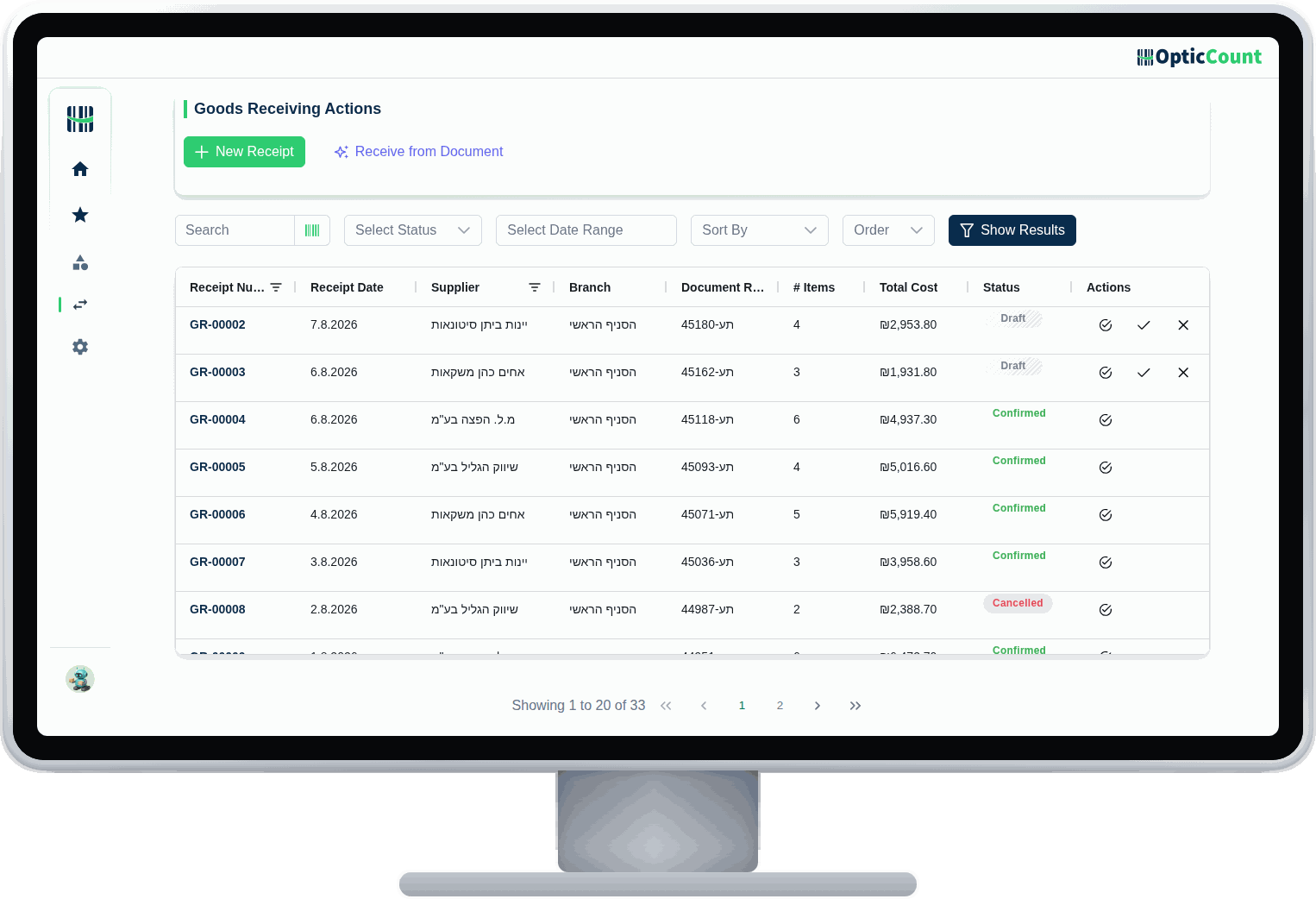
Your catalog is what the matching runs against, and where an integration supports it, an approved receipt is also written back as a supplier delivery document in the system you already run on. If that system rejects it, the receipt does not close, so the two never drift apart.
Not just reading a document. Also what happens when the document is poor, the supplier is new, and what arrived is not quite what was written.
Counts that finish faster, numbers that add up, and support one WhatsApp away.
Thank you for the wonderful service, the team and the software that helped us so much. The count took 3 days for the whole place with 14,000 items, versus 20 days last year with high deviation and inaccurate numbers. This time with OpticCount it was easy and faster, with accurate numbers and no errors.
Now that adapting your software to my business is complete, I want to thank you for the exceptional service I received throughout. I especially want to mention Tali, who took care of me with first-rate dedication and professionalism. My inventory is highly complex (over 3,300 items), and Tali never gave up, she made sure to find an answer to every request and question of mine, in the shortest time. Thanks to your software I can now stay on top of my inventory, receive up-to-date orders, and of course get an instant picture of my stock and shortages, saving costs and precious time. OpticCount is fortunate to have your employee Tali, and so am I, now that I have excellent software to manage my inventory efficiently and give my customers excellent service.
I'm really happy with the system, and especially the service! I've done inventory counts for years and never worked with a company that responded so fast and professionally. A pleasure to work with you! On top of that the software is smart and easy to operate. Truly comfortable to work with.
We use the system for inventory counts several times a year across dozens of branches. Very satisfied with the speed, accuracy and service.
Excellent and very friendly software, an amazing team and super fast service! Recommend.
Thank you for the wonderful service, the team and the software that helped us so much. The count took 3 days for the whole place with 14,000 items, versus 20 days last year with high deviation and inaccurate numbers. This time with OpticCount it was easy and faster, with accurate numbers and no errors.
Now that adapting your software to my business is complete, I want to thank you for the exceptional service I received throughout. I especially want to mention Tali, who took care of me with first-rate dedication and professionalism. My inventory is highly complex (over 3,300 items), and Tali never gave up, she made sure to find an answer to every request and question of mine, in the shortest time. Thanks to your software I can now stay on top of my inventory, receive up-to-date orders, and of course get an instant picture of my stock and shortages, saving costs and precious time. OpticCount is fortunate to have your employee Tali, and so am I, now that I have excellent software to manage my inventory efficiently and give my customers excellent service.
I'm really happy with the system, and especially the service! I've done inventory counts for years and never worked with a company that responded so fast and professionally. A pleasure to work with you! On top of that the software is smart and easy to operate. Truly comfortable to work with.
We use the system for inventory counts several times a year across dozens of branches. Very satisfied with the speed, accuracy and service.
Excellent and very friendly software, an amazing team and super fast service! Recommend.
I want to thank you for the amazing system. I'm Eyal, a minimarket owner, second year counting with it. Excellent, runs nonstop, everything online, perfectly accurate. We're a team of 4 counters with a ~40,000-item catalog and it all runs smoothly, including with suppliers. I work with Comax, and at the end one click imports everything into Comax. High-quality software, no glitches, and the price is worth it. Warmly recommend to everyone.
A really successful count, smoother than last year. Great service and availability, every question answered instantly. It used to take me weeks to wrap up; now I finished two days after the count. Having the scanners really helps. Highly recommend.
At Bana Beverages we use the system across all our branches, with many workers at once straight from the smartphone. A great tool that saves time and money.
Went great! Thank you for personal, professional guidance at the highest level.
It used to take me weeks to wrap things up, and now I finished two days after the count.
I want to thank you for the amazing system. I'm Eyal, a minimarket owner, second year counting with it. Excellent, runs nonstop, everything online, perfectly accurate. We're a team of 4 counters with a ~40,000-item catalog and it all runs smoothly, including with suppliers. I work with Comax, and at the end one click imports everything into Comax. High-quality software, no glitches, and the price is worth it. Warmly recommend to everyone.
A really successful count, smoother than last year. Great service and availability, every question answered instantly. It used to take me weeks to wrap up; now I finished two days after the count. Having the scanners really helps. Highly recommend.
At Bana Beverages we use the system across all our branches, with many workers at once straight from the smartphone. A great tool that saves time and money.
Went great! Thank you for personal, professional guidance at the highest level.
It used to take me weeks to wrap things up, and now I finished two days after the count.
Yes. Matching tries barcode and item code first and only then description. Description search survives typos, abbreviations and reordered words, and anything it is not sure about gets flagged for you rather than slipping through quietly.
Usually ten to sixty seconds, depending on its length. You can leave the page and keep unloading; the document waits, ready.
Click the item name on that row and pick the right one from the catalog. The choice is stored as an alias for that supplier, so next time the line arrives matched correctly.
Yes. Open a manual receipt, pick supplier and branch, and add items from the catalog one by one. Both routes end in the same receipt and the same stock update.
The system spots a repeat by supplier, document number and date, and warns you before a duplicate receipt is created.
No. Approval moves stock, so it is final. While a receipt is a draft you can edit or cancel it. After approval you correct it with a reversing receipt or an adjusting count.
Yes. The original file and everything extracted from it are stored beside the receipt, visible only to your company's users, and available for audit or reprocessing.
Want to save your team hours and cut mistakes? Leave your details and we'll get back to you today, with answers to your questions.
Just so we know who we're calling.