
The mistake is caught as it happens. Not in the report.
An item scanned twice, a barcode the catalog does not know, a quantity that looks odd. Instead of surfacing two weeks later in the accountant's report, it pops on the screen of whoever holds the scanner, with a button to fix it.
Mid-scan
The check runs on every scan, and the alert pops before you move on.
Your choice
Every alert can be switched on or off in settings, to match the count and the business.
With a fix
Not just "there is a problem": similar-item suggestions, add-to-catalog in a tap, or a conscious approval.
The alert reaches whoever can fix it. Now.
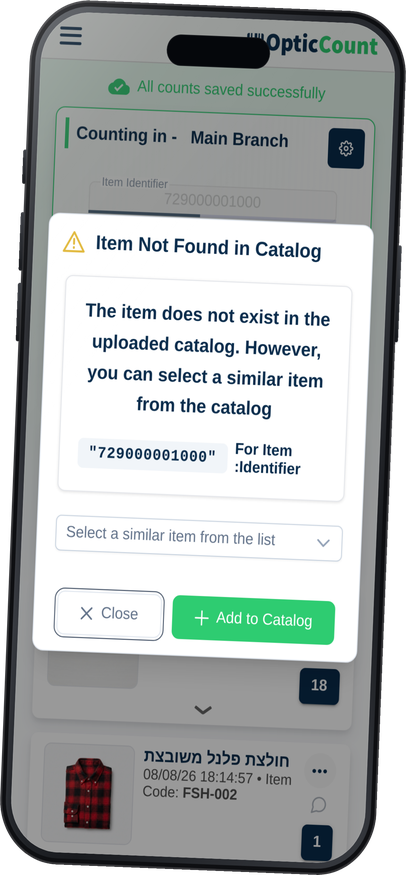
A barcode not found in the catalog raises the alert immediately, and with the similar-items list enabled you also get the closest suggestions. The worker fixes it in a second and moves on, instead of leaving a note for someone.
Item not in the catalog
The system suggests similar items by the identifier, or lets you add the new item straight from the alert.
A duplicate in the count
The same item scanned again in the same area? You get a message and choose: merge the quantity, or check what happened on the shelf.
Manual confirmation when precision matters
You can require a quantity confirmation on every scan, say in a year-end count, when every line is money.
The safety net of people who scan fast.
Duplicate alert
The same item twice in one count raises a question, not a silent error
Item not in catalog
Similar suggestions or add-in-a-tap, without losing pace
Quantity anomaly
A number that looks wrong asks for approval before it enters
Optional manual confirm
A mode where every scan is approved, for sensitive counts
Everything tunable
Switch each alert on or off separately, in settings
Decisions recorded
Every approval or dismissal is logged and reviewable
What people ask us
Won't the alerts slow the workers down?
An alert pops only when something is genuinely off, and most scans pass clean. A business that wants quiet can switch specific alerts off.
What if a worker ignores an alert?
The decision is recorded. You can revisit it from count management and see who approved what, instead of guessing after the fact.
Can we set our own thresholds?
Yes. Quantity thresholds and alert behavior are set per business, so alerts match what counts as unusual for you.
See it work on your actual inventory
Want to save your team hours and cut mistakes? Leave your details and we'll get back to you today, with answers to your questions.
Nice to meet you
Just so we know who we're calling.