
Upload one Excel. Get a catalog that works.
The system recognizes your columns by itself: name, barcode, price, size, color. Approve the mapping once, and from that moment every scan finds its item. No hand-typed catalog, no implementation project.
One file
XLSX or CSV, and column order does not matter. Recognition is by column names.
Tens of thousands
Built for tens of thousands of items and hundreds of thousands of scans, without slowing down.
From the floor
Found a wrong price mid-count? Fix it in the app and it saves for everyone.
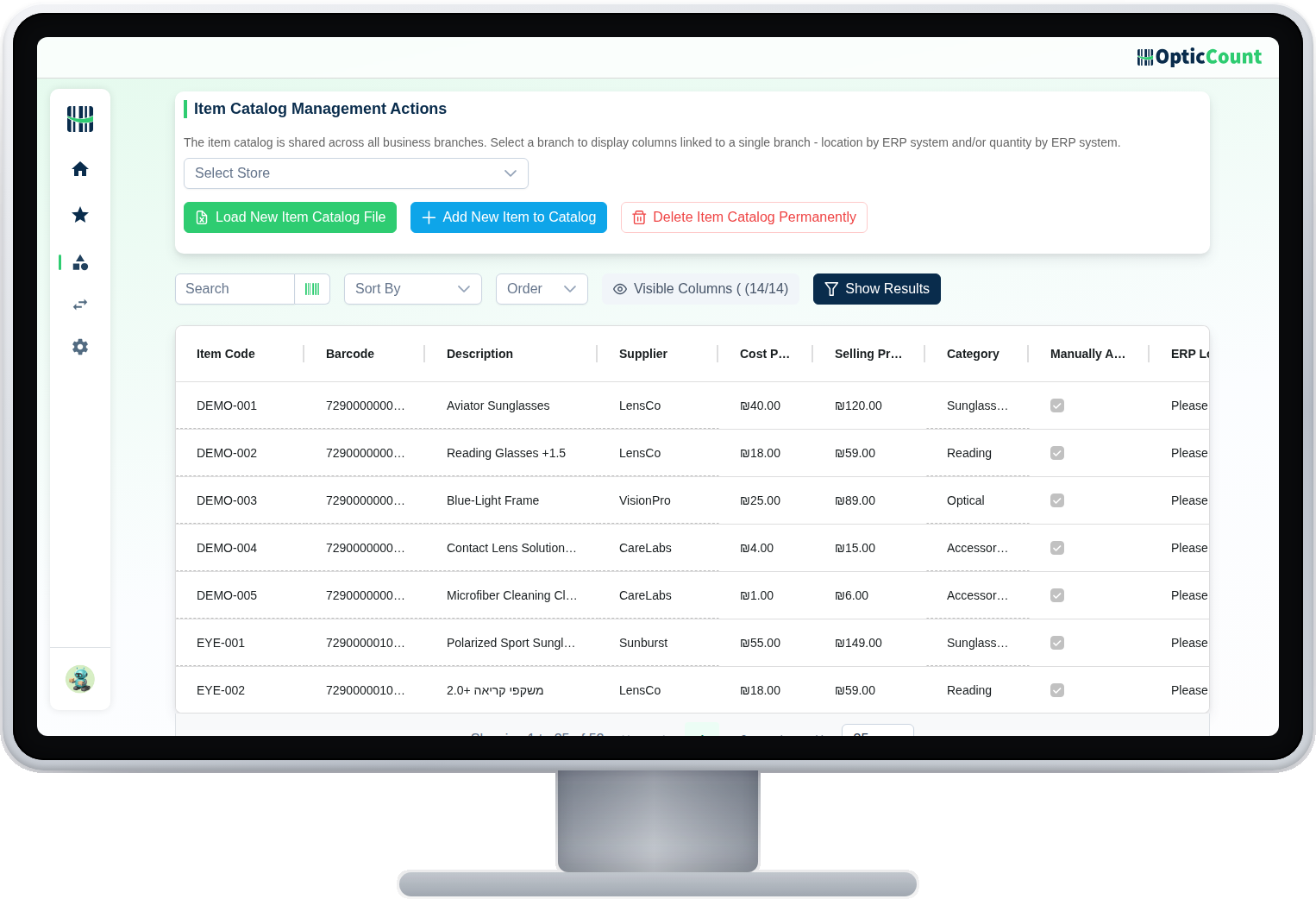
Every item, in a table you can actually work with.
The catalog management screen: search, filter, edit and add, with every field your business needs. This is what every scan in the field leans on.
Variants are not a trick
Size, color and model are real fields. Multiple barcodes for one SKU? Supported directly, common in fashion and footwear.
A new item without stopping
Scanned something that does not exist? Add it to the catalog straight from the alert and keep counting. Fill in details later.
Search that gets half a word
No barcode in hand? Type part of the name or SKU, and autocomplete shows the matches immediately.
What makes a catalog you can trust.
Smart column mapping
Automatic recognition by your file's column names
Built-in variants
Size, color and model as separate fields, in exports too
Multiple barcodes per SKU
Different packagings converge into one record
Autocomplete
Half a name is enough to find the right item
Edit from any screen
Price, location or description update from the phone too
Item photos
The scan card shows a photo, name and code
Synced to every device
One update reaches everyone scanning, live
Built from scans too
Start from zero and let the floor build the catalog
The base of every workflow that starts with a scan.
What people ask us
What file do we need to bring?
XLSX or CSV with whatever columns you have. A SKU or barcode column is enough to start; everything else can be completed along the way.
We have several barcodes for the same item. A problem?
No, it is supported directly. Especially common with size and color variants. A unique barcode per variant keeps the reports sharp.
Our catalog is huge. Will it hold?
Yes. The system is built for tens of thousands of items and hundreds of thousands of scans, and search stays fast at that scale.
What happens when we connect an ERP?
The catalog is pulled from there and stays synced, so you never maintain two lists. Until then, an Excel file does the job well.
See it work on your actual inventory
Want to save your team hours and cut mistakes? Leave your details and we'll get back to you today, with answers to your questions.
Nice to meet you
Just so we know who we're calling.