


























Skip to content
OpticCount
Equipment loan & return management

One system for every piece of kit that leaves.

Tools and gear loaned to staff, equipment rented out for events, and kit sitting in the units you manage. Scan it out and back from a phone, and know at any moment what hasn't returned, who has it, and what it's worth.

  • Track equipment loaned to staff and customers
  • Out and back with a barcode scan from the phone
  • A net balance and value per borrower, any time

Over 600 businesses tried it and loved it

Who runs on this

Equipment loans, rentals and managed-property kit. One mechanism.

Each of them shares a single problem: kit that leaves its place and has to come back, and somebody accountable for knowing where it is.

Equipment loans to staff

Scanners, drills, laptops

A technician heads out with equipment and brings it back at the end of the week. The loan sits against their name, and anything that doesn't come back shows exactly who still has it.

The borrower is the employee
Event equipment rental

Chairs, sound, lighting

Scan everything out before the event and back in afterwards. Whatever didn't return shows as an open balance against that customer.

The borrower is the customer

Property management equipment

Equipment sitting in a unit

Fridge, bed, tool kit. Each apartment or tenant is a borrower, so moving someone in or out becomes one screen showing what should be there against what actually is.

The borrower is the unit or tenant

Schools, clubs and building sites

Anything that goes out and should come back

Laptops to students, kit to players, tools to a subcontractor. If it goes out and is meant to come back, it fits.

The borrower is whoever you define

How it works

Two modes. They cannot be confused.

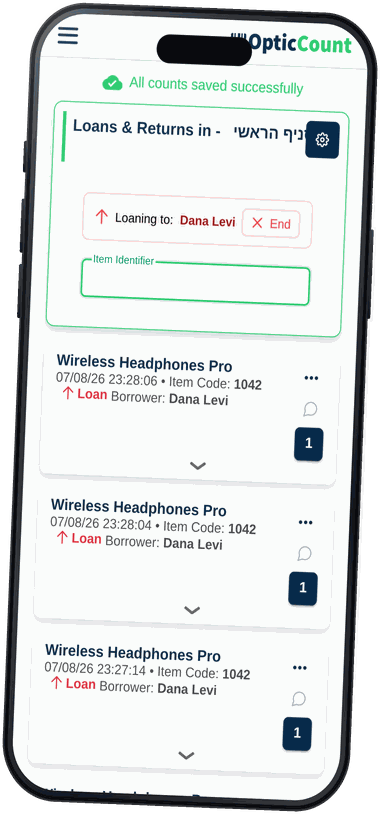
Open a borrower from the list and press loan or return. The screen opens locked to that borrower and that direction, and stays that way until you close it.

Loan

Items go out, recorded against the borrower

Return

Items come back and their balance settles

  • Borrower and direction lock up front

    In an ordinary count you pick a borrower per item. Here you pick once, and every scan in the session lands correctly. That is what prevents the classic mistake: a loan recorded as a return.

  • Scan the usual way

    Phone camera, Bluetooth gun, or typing a barcode or item code. Same screen and same speed as counting.

  • A note on any scan

    "Went out with the charger", "came back scratched". Free text saved on the event itself and shown later on the borrower's card.

  • By branch and by permission

    Anyone with several branches picks one when the session starts. Viewing borrowers and creating them are two separate permissions.

Every borrower's card

What went out, what came back, what's still theirs.

Every borrower has a card with the full picture, and every item answers the reverse question: who is holding it right now.

  • A net balance, not a feed of events

    The system computes loans minus returns per item, so the bottom line is how much is actually still with them.

  • And what it's worth

    Alongside the quantity sits the value of what they hold, at catalog selling price. A conversation about gear that never came back sounds different with a number on it.

  • Filter by date, export it

    Narrow to a date range and download an Excel with the per-item detail, the price and the total value. Handy before billing a customer or running a kit audit.

  • From the item back to the people

    Scan an item and see who holds it and how much, next to the quantity in each branch. "We're out" often turns out to be "it's all out on loan".

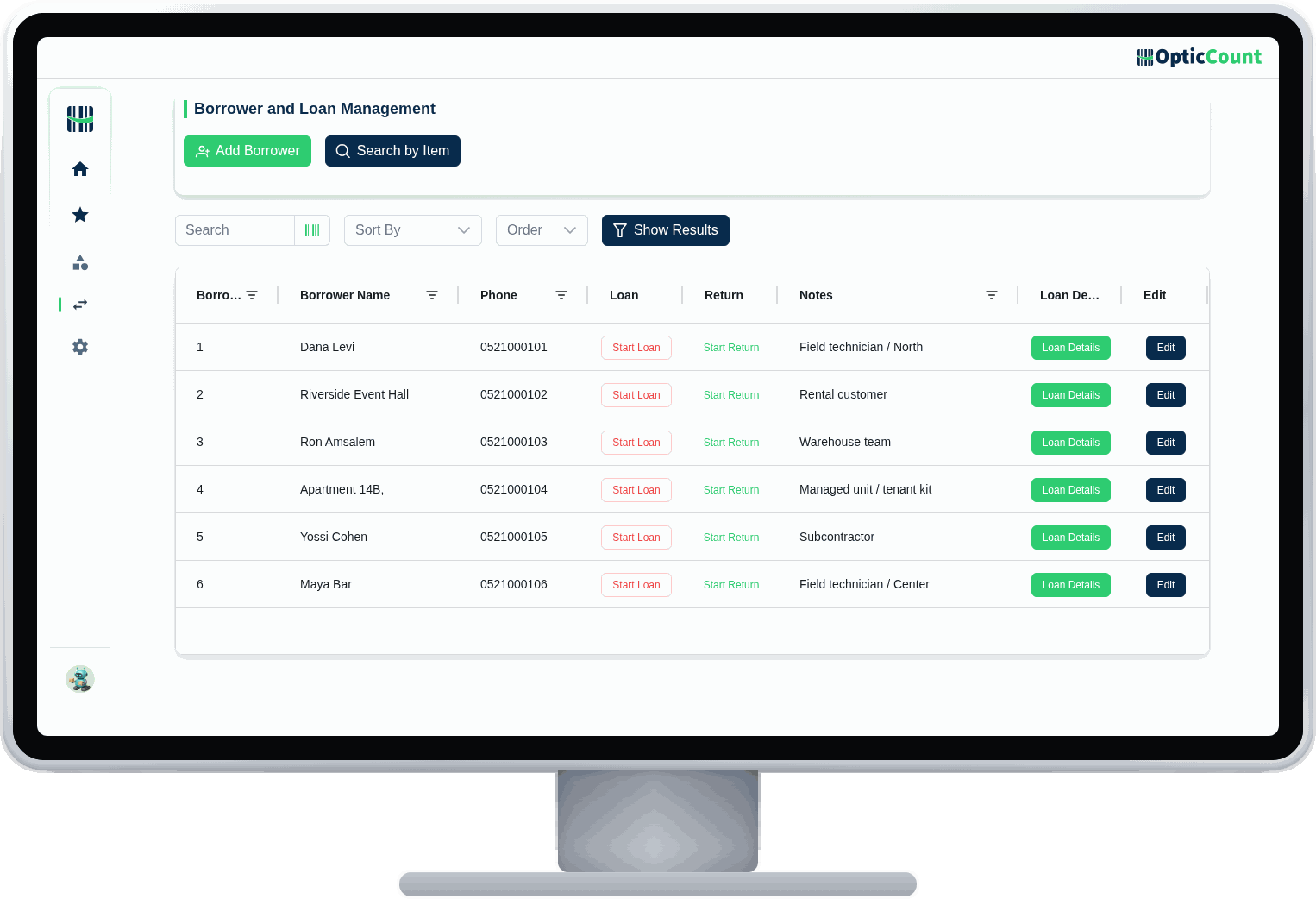
The borrower management screen in OpticCount: the borrower list with loan, return and loan-detail actionsA loan session on a smartphone: locked to one borrower, with every scan recorded as a loan
Capabilities

Everything real equipment tracking asks for.

Not only recording who took it. Also finding the item, settling the account, and getting a report out of it.

Borrower list
Name, phone and a free-text note per borrower
Staff or customer
The same record serves an employee, a customer, a unit or a team
Free search
By name, phone, note or borrower number
Loan session
Locked to one borrower, every scan goes out on their name
Return session
Locked to the same borrower, every scan settles their balance
Scan from the phone
Camera, Bluetooth gun, or typed in by hand
A note per event
Free text saved on the loan or return itself
Net balance
Loans minus returns, per item and per borrower
Value of what's out
The total held by a borrower at catalog selling price
Per-item breakdown
Code, description, barcode, out, back, and what remains
Date filtering
Narrow a card to the range that matters to you
Excel export
The full borrower card in a file, total value included
Who has the item
Scan an item and see everyone currently holding it
From the item card too
The borrower list also appears inside the item's own details
Stock beside loans
The per-branch quantity shows next to the holders
Works by branch
Pick a branch when the session starts, same as counting
Two separate rights
Viewing and managing, and separately creating and deleting borrowers
Loans are never blocked
Even when recorded stock is low, so the record matches reality

Simple, transparent pricing

Loans and returns is its own module. The calculator shows exactly what it adds to the monthly bill, next to your users and any other modules.

Loans & borrowers is pre-selected for you

Questions

What people ask us

What does it take to set up a borrower?

A name and a phone number, plus an optional note. That's it. Plenty of teams use the note field for a department, a site or a unit number, whichever way they think about it.

What if someone returns gear we never recorded going out?

Record the return anyway. The maths is net, so the balance corrects itself. Staying consistent about which borrower you pick is still worth it.

Can we find out who has a particular item?

Yes. Scan or type the item and you get the list of holders with the quantity each one has, alongside the quantity in every branch.

Do we get an alert when something is overdue?

No, and we won't pretend otherwise. There is no due date and no overdue notification today. What there is: a borrower card showing exactly what is still with them, and date filtering that makes a kit audit quick.

Can we get a report out of it?

Yes. A borrower's card exports to Excel with every item, how much went out, how much came back, what remains, the selling price and the total value.

Who can create borrowers, and who can only look?

Those are two separate permissions. You can give the floor team access to view and to run loans and returns, while creating and deleting borrowers stays with whoever administers the system.

Let's talk

See it work on your actual inventory

Want to save your team hours and cut mistakes? Leave your details and we'll get back to you today, with answers to your questions.

Tali· OpticCount team
Leave your details, we'll get back shortly
Online now
1 of 31

Nice to meet you

Just so we know who we're calling.