























Sheet or handheldThe phone in their pocket
No dedicated hardware, no monthly rental, no training day
Every item is scanned against the order before it goes in the box. The wrong item or one too many stops at the shelf, so what leaves the door is exactly what the customer ordered.
Fashion retail · Ramat Aviv branch
Over 600 businesses tried it and loved it
Sheet or handheldThe phone in their pocket
No dedicated hardware, no monthly rental, no training day
Average accuracy of 99.4%
With every item scanned and verified against the order
Picking speed of 2x or more
Compared with a printed sheet or an ageing handheld
Follow one order, step by step: how it arrives, who picks it, and how it lands back in your ERP, updated.
That's how picking turns from a stressful race against a sheet of paper into a process that is orderly, fast and accurate, and customers get exactly what they ordered.
Two sides of the same order. In the warehouse it's one clear list showing how much of each line is already collected; in the office it's every order together: who's on it, what's urgent, and what has already shipped.
Their order, and how much is already collected. No paper.
Status, priority and who is handling it, in the office.
Every scan on the floor updates the board instantly.
Every order on one screen, with a status that's actually true.
Every status change is logged: who moved it, when, and why.
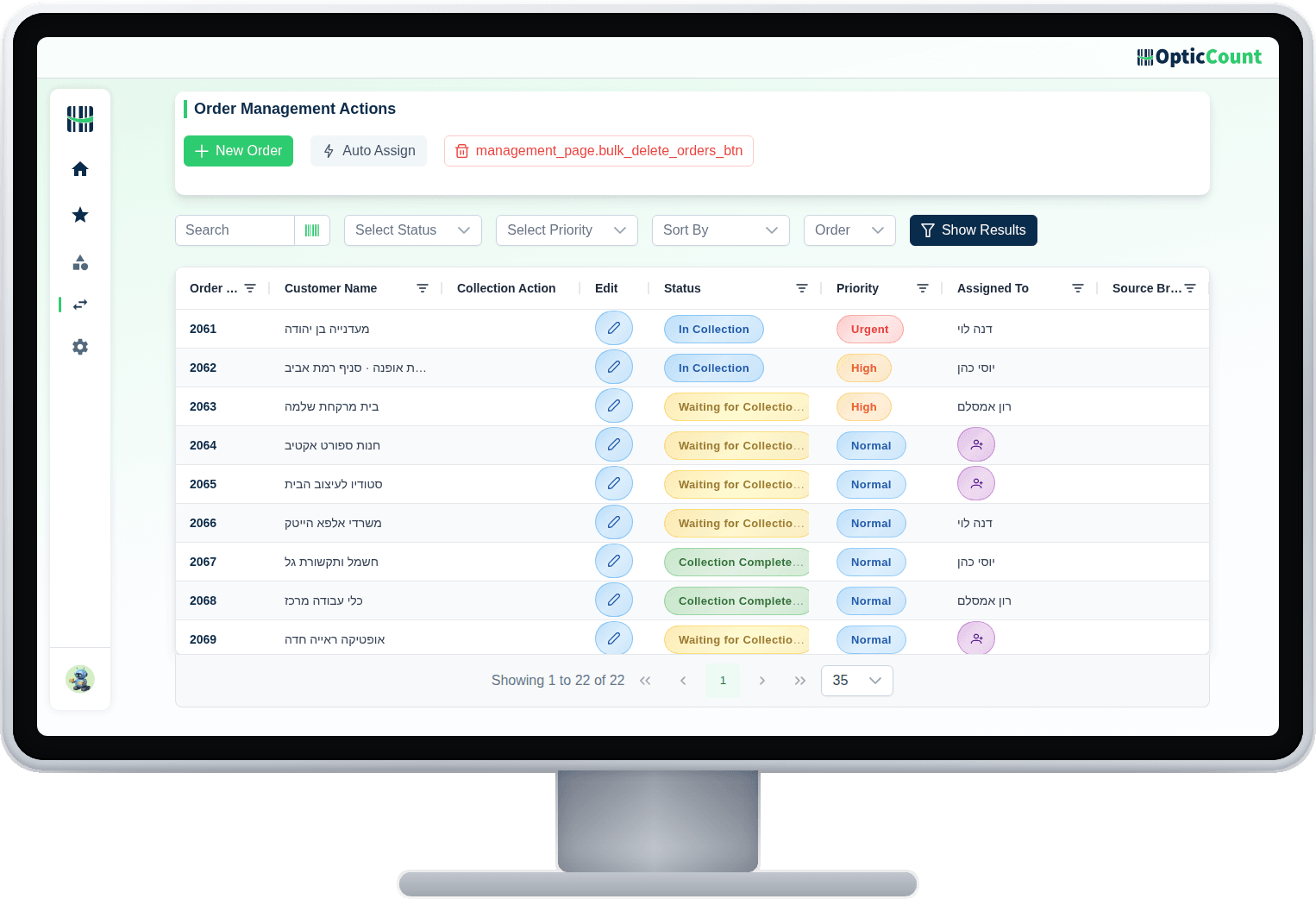
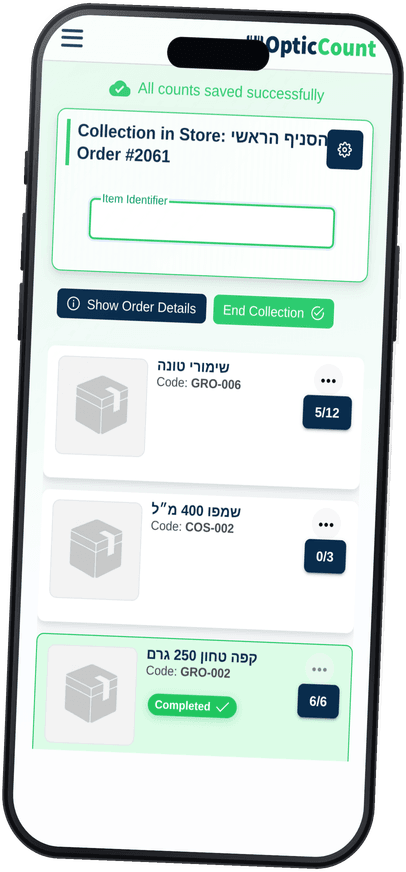
It splits orders between pickers, holds the priorities, and catches what nobody notices.
A new order goes to the next picker in line, or to whoever has the lightest load. Nobody sits and hands out work.


The picker marks a replacement and adds a note. The office sees exactly what changed and why, before it reaches the customer.
“Out of stock, cleared with the customer”
A line deleted in the source system is flagged on the picker's screen. You don't pack an item that's already been cancelled.
A priority and a due date on every order. What has to ship today sits at the top, not somewhere in the middle.
If something ran out, close the order partially and keep moving. You can also stop, hand it to another picker, and carry on from exactly that point.
Who picked it, when, and which location it came from. When something slips, you know exactly where to look.
DanaA-1209:41YossiB-0309:44DanaA-0709:47Orders arrive from your store, your ERP or a picker on the floor, all into one queue. When they close, the result flows back to the source with no double entry.
The small details that separate a nice demo from a warehouse that works. Hover any tile to see what it does for you.
Counts that finish faster, numbers that add up, and support one WhatsApp away.
Thank you for the wonderful service, the team and the software that helped us so much. The count took 3 days for the whole place with 14,000 items, versus 20 days last year with high deviation and inaccurate numbers. This time with OpticCount it was easy and faster, with accurate numbers and no errors.
Now that adapting your software to my business is complete, I want to thank you for the exceptional service I received throughout. I especially want to mention Tali, who took care of me with first-rate dedication and professionalism. My inventory is highly complex (over 3,300 items), and Tali never gave up, she made sure to find an answer to every request and question of mine, in the shortest time. Thanks to your software I can now stay on top of my inventory, receive up-to-date orders, and of course get an instant picture of my stock and shortages, saving costs and precious time. OpticCount is fortunate to have your employee Tali, and so am I, now that I have excellent software to manage my inventory efficiently and give my customers excellent service.
I'm really happy with the system, and especially the service! I've done inventory counts for years and never worked with a company that responded so fast and professionally. A pleasure to work with you! On top of that the software is smart and easy to operate. Truly comfortable to work with.
We use the system for inventory counts several times a year across dozens of branches. Very satisfied with the speed, accuracy and service.
Excellent and very friendly software, an amazing team and super fast service! Recommend.
Thank you for the wonderful service, the team and the software that helped us so much. The count took 3 days for the whole place with 14,000 items, versus 20 days last year with high deviation and inaccurate numbers. This time with OpticCount it was easy and faster, with accurate numbers and no errors.
Now that adapting your software to my business is complete, I want to thank you for the exceptional service I received throughout. I especially want to mention Tali, who took care of me with first-rate dedication and professionalism. My inventory is highly complex (over 3,300 items), and Tali never gave up, she made sure to find an answer to every request and question of mine, in the shortest time. Thanks to your software I can now stay on top of my inventory, receive up-to-date orders, and of course get an instant picture of my stock and shortages, saving costs and precious time. OpticCount is fortunate to have your employee Tali, and so am I, now that I have excellent software to manage my inventory efficiently and give my customers excellent service.
I'm really happy with the system, and especially the service! I've done inventory counts for years and never worked with a company that responded so fast and professionally. A pleasure to work with you! On top of that the software is smart and easy to operate. Truly comfortable to work with.
We use the system for inventory counts several times a year across dozens of branches. Very satisfied with the speed, accuracy and service.
Excellent and very friendly software, an amazing team and super fast service! Recommend.
I want to thank you for the amazing system. I'm Eyal, a minimarket owner, second year counting with it. Excellent, runs nonstop, everything online, perfectly accurate. We're a team of 4 counters with a ~40,000-item catalog and it all runs smoothly, including with suppliers. I work with Comax, and at the end one click imports everything into Comax. High-quality software, no glitches, and the price is worth it. Warmly recommend to everyone.
A really successful count, smoother than last year. Great service and availability, every question answered instantly. It used to take me weeks to wrap up; now I finished two days after the count. Having the scanners really helps. Highly recommend.
At Bana Beverages we use the system across all our branches, with many workers at once straight from the smartphone. A great tool that saves time and money.
Went great! Thank you for personal, professional guidance at the highest level.
It used to take me weeks to wrap things up, and now I finished two days after the count.
I want to thank you for the amazing system. I'm Eyal, a minimarket owner, second year counting with it. Excellent, runs nonstop, everything online, perfectly accurate. We're a team of 4 counters with a ~40,000-item catalog and it all runs smoothly, including with suppliers. I work with Comax, and at the end one click imports everything into Comax. High-quality software, no glitches, and the price is worth it. Warmly recommend to everyone.
A really successful count, smoother than last year. Great service and availability, every question answered instantly. It used to take me weeks to wrap up; now I finished two days after the count. Having the scanners really helps. Highly recommend.
At Bana Beverages we use the system across all our branches, with many workers at once straight from the smartphone. A great tool that saves time and money.
Went great! Thank you for personal, professional guidance at the highest level.
It used to take me weeks to wrap things up, and now I finished two days after the count.
An item catalog (an Excel file is perfectly fine) and one smartphone. You can start with an order typed in by hand and connect your store or ERP later.
It doesn't go in. The system refuses it and tells the picker the item isn't on this order. Same for quantity: you can't pick more than was ordered.
Each picker works one order at a time, and several pickers can work in parallel, each on their own order. Wave picking (collecting items for several orders in one pass) isn't supported yet.
Mark a replacement with a note, or leave the line partial. Either way it shows up in the office before the order goes out.
A line deleted in the source system is flagged on the picker's screen and excluded from the post back. You don't pack an item that's already been cancelled.
Yes. Orders arrive automatically from Shopify and Wix, and from management systems like Priority, Bina, Hashavshevet, BOSS and Minisoft.
Yes. Reassign it and the new picker continues from exactly where it stopped, with everything already picked intact.
No. Every employee's smartphone becomes a scanner. You can add a Bluetooth scanner if you want, but it's an option, not a requirement.
Want to save your team hours and cut mistakes? Leave your details and we'll get back to you today, with answers to your questions.
Just so we know who we're calling.